My FreeBSD setup
Documentation of my old FreeBSD setup Update in 2025: After using FreeBSD for a few years, the little netbook gave up the ghost. I no longer use FreeBSD as a daily driver. I’m leaving the information below in case I ever pick FreeBSD up again. Over the past few years, I’ve been feeling more and more ill at ease with my Linux systems. The main reason for this is systemd. I won’t go into a full-on anti-systemd rant in this post; there has been enough ink spilled on that topic. Initially, I tried out OpenBSD, but had a bit of trouble getting going started (mainly, I couldn’t get neovim to build), and the system performance on my netbook was pretty bad. I switched to FreeBSD, assuming that some of these things would be better, and indeed, they were. Neovim is just a I also decided to drop KDE and switch to i3, the window manager. I never used KDE on my netbook, on that one I always kept OpenBox. I’m absolutely in love with i3. It’s very lightweight, though requires a pretty fair amount of configuration in order to be usable (or at the very minimum, fit my needs). After a few days of mucking about, this is what my setup looks like: And this is what my lock screen looks like: I’ll keep this article updated with my configuration, mostly as a way to help myself set up new systems. Some of this stuff might end up in my dotfiles repository, though. I haven’t documented or stored all of this to my dotfiles repositories yet. Come back later? :) Following is a list of packages that I usually install pretty quickly after setting up a new system: I’m an absolute FreeBSD noob, so some of the stuff listed here is probably suboptimal. Feel free to tell me on Twitter or drop me an email if there’s anything I should change.pkg command away (even though it’s version 0.1.2), and the whole system feels incredibly responsive.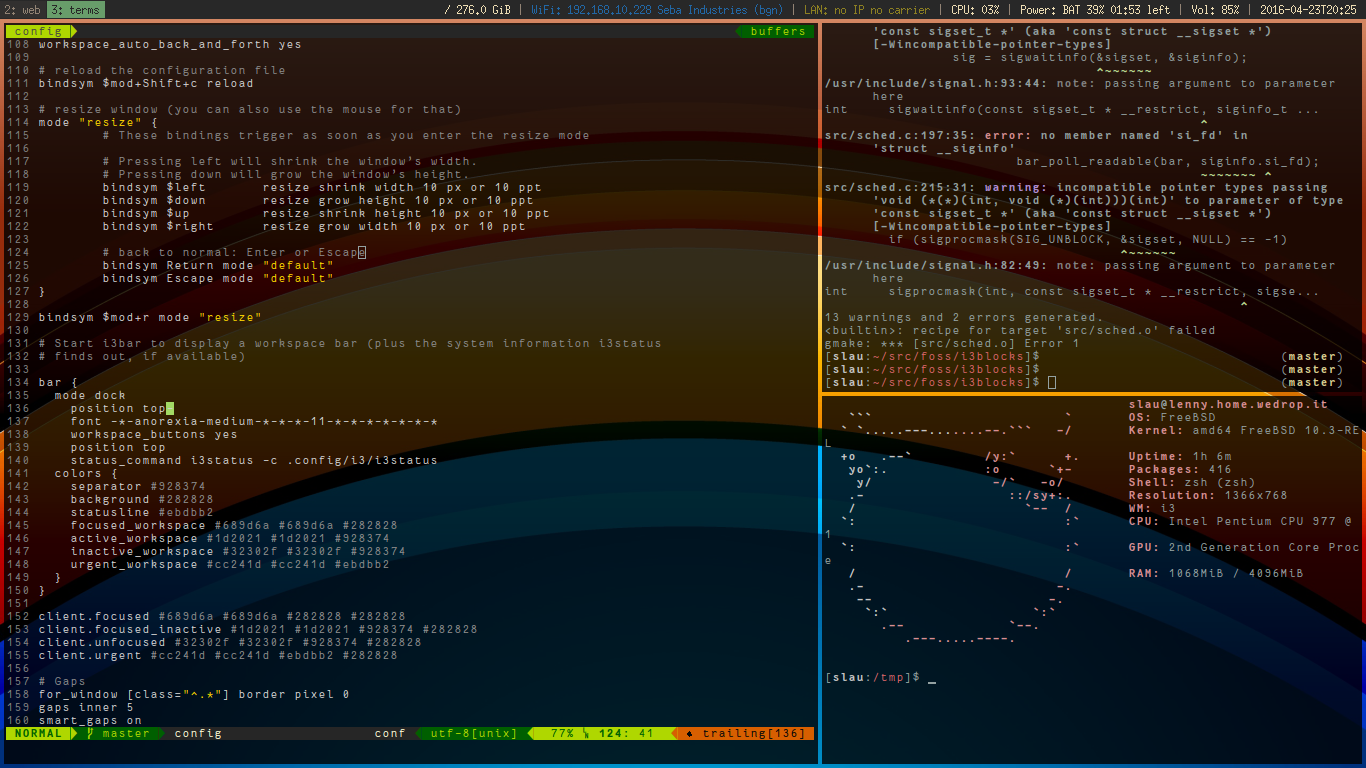
Base system
/etc/sysctl.conf:# Enchance shared memory X11 interface
kern.ipc.shmmax=67108864
kern.ipc.shmall=32768
# Enhance desktop responsiveness under high CPU use (200/224)
kern.sched.preempt_thresh=224
# Bump up maximum number of open files
kern.maxfiles=200000
# Disable PC speaker
hw.syscons.bell=0
# Shared memory for Chromium
kern.ipc.shm_allow_removed=1
# Allow users to mount disks
vfs.usermount=1
# Synaptics configuration
hw.psm.synaptics.min_pressure=40
# Suspend on lid close
hw.acpi.lid_switch_state=S3/boot/loader.conf:# Load intel graphics driver
i915kms_load="YES"
# Reduce GPU power consumption (SandyBridge/IvyVridge)
drm.i915.enable_rc6=7
# Allow loading of the realtek firmware (wifi dongle)
legal.realtek.license_ack=1
# Use new graphical console driver
kern.vty=vt
# Devil worship in loader logo
loader_logo="beastie"
# Boot-time kernel tuning
kern.ipc.shmseg=1024
kern.ipc.shmmni=1024
kern.maxproc=10000
# Load MMC/SD card-reader support
mmc_load="YES"
mmcsd_load="YES"
sdhci_load="YES"
# Access ATAPI devices through the CAM subsystem
atapicam_load="YES"
# Filesystems in Userspace
fuse_load="YES"
# Intel Core thermal sensors
coretemp_load="YES"
# In-memory filesystems
tmpfs_load="YES"
# Asynchronous I/O
aio_load="YES"
# Handle unicode on removable media
libiconv_load="YES"
libmchain_load="YES"
cd9660_iconv_load="YES"
msdosfs_iconv_load="YES"
# Load sound subsystem
snd_driver_load="YES"
# Enable better trackpad support
hw.psm.synaptics_support=1/etc/rc.conf:hostname="somemachine.home.wedrop.it"
# Enable DHCP but don't let it block the boot process
background_dhclient="YES"
# Try to configure re0 (wired) on boot
ifconfig_re0="DHCP"
# Clone urtwn0 to a device called wlan0
wlans_urtwn0="wlan0"
# Configure wlan0 to connect through WPA and use DHCP
ifconfig_wlan0="WPA SYNCDHCP"
keymap="uk.iso.kdb"
# Remote logins
sshd_enable="YES"
# Set dumpdev to "AUTO" to enable crash dumps, "NO" to disable
dumpdev="AUTO"
moused_enable="YES"
# powerd: hiadaptive speed while on AC power, adaptive while on battery
powerd_enable="YES"
powerd_flags="-a hiadaptive -b adaptive"
# Reduce power consumption by using higher C-states than the default of C1
performance_cx_lowest="Cmax"
economy_cx_lowest="Cmax"
# Enable bluetooth
hcsecd_enable="YES"
spdp_enable="YES"
# Synchronize system time
ntpd_enable="YES"
# Let ntpd make time jumps larger than 1000sec
ntpd_flags="-g"
# Enable dbus (IPC)
dbus_enable="YES"
# Enable hald (hardware detection), should not be required.
# hald_enable="YES"
# Enable graphical login
slim_enable="YES"User configuration
Installed ports
Terminal and shell stuff
Development
Desktop environment